| 實 習 內 容 | |
實 習 目 標 |
1. 資料檔案處理 2. 陣列定義、處理、與陣列參數傳遞 3. 平均值與標準差的估算 4. 實作 selection sort 演算法來排序 5. 中數與眾數的估算 6. histogram 計算與呈現 |
1 |
請下載下列資料檔案 raw1.dat, raw2.dat, raw3.dat (請注意不要改檔案的副檔名) 及 範例執行檔案 至同一資料匣, 並且執行 這個程式是一個很標準的資料處理工具程式,main() 函數如下, 你可以看到裡面定義所使用到的資料變數 dataSize, frequency 陣列, 以及 data 陣列, 然後呼叫 readFile 從檔案裡把資料讀進 data 陣列, dataSize 是陣列中實際存放資料的筆數, 其後呼叫 mean_standard_deviation 函數來計算平均值和標準差, 此函數沒有回傳任何資料, 實際上計算出來的數值直接就寫到螢幕上了; 接下來呼叫 median 函數計算中數, 最後呼叫 mode 函數計算眾數, 最後留在 frequency 陣列裡是資料陣列中每一個數值出現的次數。 這個程式在設計的時候就是使用很標準的 top-down 設計方法, 把程式的功能分成幾個比較獨立的部份, 用函數來實作每一個獨立的部份功能。
|
2 |
由檔案中以文字模式讀取資料:
|
3 |
平均值與標準差的估算:
|
4 |
陣列排序中數的計算:
|
5 |
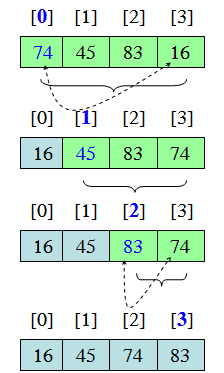
Selection Sort 排序演算法:
|
6 |
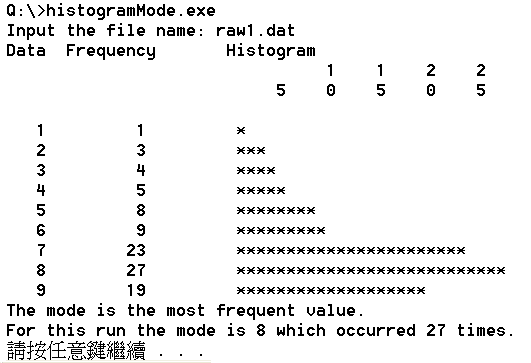
眾數的估算與 histogram 在文字介面中的呈現:
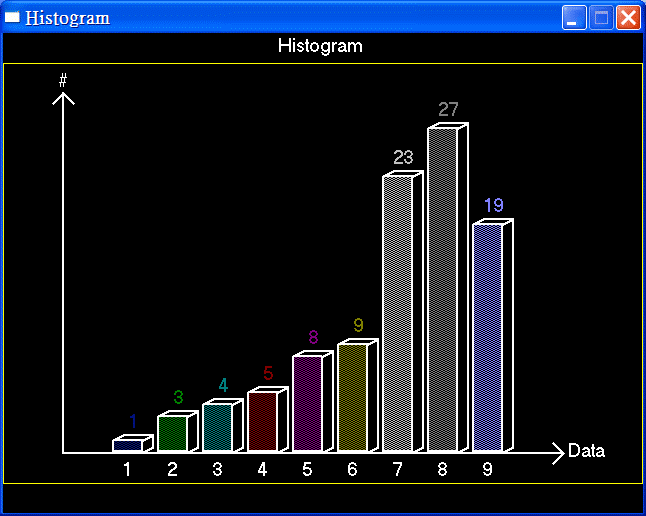
當然, 你也可以用我們先前談到的 BGIm 圖形介面的 bar3D 來繪製 histogram
#include <graphics.h>
    ....
void histogram(int size, const int data[])
{
    int i, left, bottom, width, unitHeight;
    char buf[40];

    initwindow(640, 480, "Histogram", 50, 50);

    setcolor(YELLOW);
    rectangle(0,30,639,450);
    settextstyle(SANS_SERIF_FONT,HORIZ_DIR,2);
    setcolor(WHITE);
    outtextxy(275,0,"Histogram");

    setlinestyle(SOLID_LINE,0,2);

    line(60,420,60,60); // y-axis
    line(50,70,60,60);  // arrow
    line(70,70,60,60);

    line(60,420,560,420); // x-axis
    line(550,410,560,420); // arrow
    line(550,430,560,420);

    outtextxy(55,35,"#");
    outtextxy(565,405,"Data");

    left = 110;
    bottom = 419;
    width = 45;
    unitHeight = 12;
    for (i=0; i<size; i++)
    {
        setfillstyle(INTERLEAVE_FILL, i+1);
        bar3d(left+i*width,
              bottom-data[i]*unitHeight,
              left+(i+1)*width-15,
              bottom,
              10,
              2);
        setcolor(i+1);
        sprintf(buf, "%2d", data[i]);
        outtextxy(left+i*width+10, bottom-data[i]*unitHeight-31,buf);
        setcolor(WHITE);
        sprintf(buf, "%2d", i+1);
        outtextxy(left+i*width+4, bottom+5,buf);
    }
} |
7 |
陣列資料的列印: 陣列資料在標準輸出入函數庫中並沒有特別的函式來列印, 請自行撰寫迴圈來列印, 自行決定每一列需要列印幾筆資料
|
回
計算機程式設計實習
首頁
製作日期: 101/11/16
by 丁培毅 (Pei-yih Ting)
E-mail: pyting@ntu.edu.tw